¶ Player Warps
Player Warps are a teleport command set by a player that will allow others to teleport to a certain location without the hassle of inviting them one by one or having to be online at all. They are most frequently used to set up shops, public farms, and Towns that have yet to be approved for a server warp.
¶ Visiting a PW (Player Warp)
To visit a player warp, use the command /pw where you'll see the five unique categories; Build, Shop, Farm, PvP, & Other. Click on any one of the icons to see all the warps within the category where you'll then be subjected to click another icon to teleport you to a specific warp.
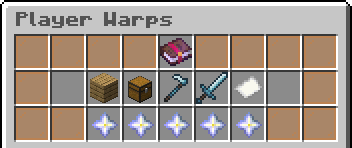
To visit a player warp directly, you can use the command /pw [name]
You're also able to see the details of a player warp as seen below:
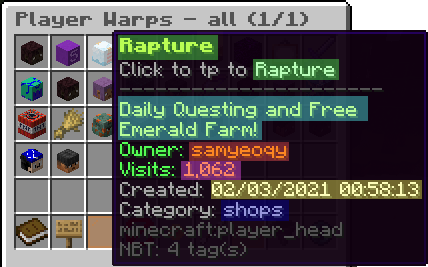
| Color | Meaning |
|---|---|
| Green | Name |
| Light Blue | Description |
| Red | Owner |
| Pink | Unique Visits |
| Yellow | Creation Date |
| Dark Blue | Category |
PWs are sorted by the amount of Unique Visits each one has starting with the most visited and ending with the least visited. Each player counts as 1 unique visit, no matter how many times they have visited afterwards.
¶ Setting Up a PW
To open a player warp, you'll need to stand on the block and face the direction that you wish visitors to see when they warp in then use the command /pw set [name] where you will get a confirmation message as seen below.

You will need to quickly retype the command to confirm creating the player warp, or it may not set the warp. You could also the Up Key (⇡) to quickly repeat the last command.
100k will be deducted from your balance and your player warp has successfully been created! After this point, 100k will be deducted from your balance every 30 days. Should you not have the money necessary, the warp will be closed and will need to be reset in order for other players to use it.
By default, all players can only have one player warp at a given time. By ranking up to [Conqueror] and [Ethereal] you will unlock more PW slots, for a maximum of three.
¶ Customizing a PW
¶ Adding Descriptions
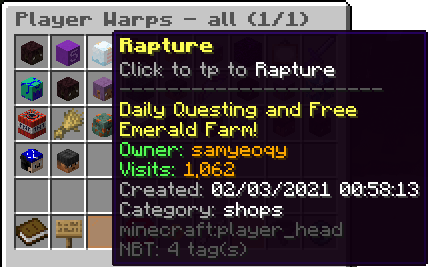
After creating your pw, you can add a description to let other players know what your warp is for by hovering your cursor over it. To set a description, use the command /pw desc set [name] [description]
For example /pw desc set Rapture Daily Questing and Free Emerald Farm!
¶ Setting Categories
You can mark your player warp as a special type of category, making it easier for players to filter through and find you in the sea of different player warps. The 5 categories are; Build, Shop, Farm, PvP, & Other. Once you have decided on a category, you can set the category type using the command /pw category set [name] [category type]
For example /pw category set Rapture Shops
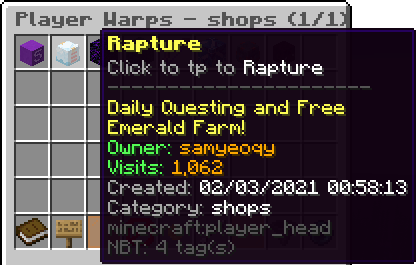
Once a category type is set, visitors can click on the corresponding category to access your warp.
¶ Advertising & Sponsoring a PW
After successfully setting up a player warp, you can advertise the pw to attract players to it. Some of the most popular options are:
- Posting signs on the Notice Board at /spawn
- Using the /advert command (2.5k per use)
- Purchasing a sponsor slot in the /pw command where your warp will be displayed on the main /pw page
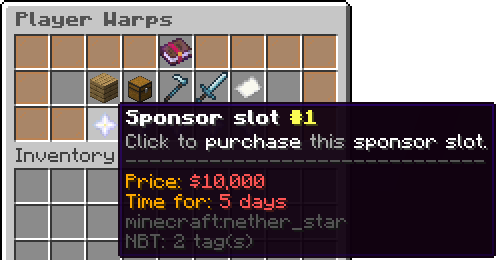
| Sponsor Slot | Cost | Duration |
|---|---|---|
| Sponsor slot #1 | 10k | 5 days |
| Sponsor slot #2 | 8k | 4 days |
| Sponsor slot #3 | 6k | 3 days |
| Sponsor slot #4 | 4k | 2 days |
| Sponsor slot #5 | 2k | 1 day |
¶ FAQs
Some useful commands:
- When renaming a PW:
- Use the command /pw rename [name] [newname]
- When resetting the spawn point for a PW:
- Use the command /pw reset [name]
- When deleting a PW:
- Use the command /pw remove [name]
* Using the command /pw help in-game will show all available PW commands